클라우드팡
Windows 10에 Linux용 Windows 하위 시스템 설치 with RHEL 본문
Windows 10에 WSL(Linux용 Windows 하위 시스템) 설치
Bash 터미널을 사용하여 Linux 배포(Ubuntu, Debian, SUSE, Kali, Fedora, Pengwin 및 Alpine 포함)를 Windows 10 컴퓨터에 설치하는 방법을 알아봅니다.
docs.microsoft.com
rpm, yum, dnf issues under unsupported Windows Subsystem for Linux (WSL) - Red Hat Customer Portal
After an RPM database rebuild, like rpm --rebuilddb, commands like rpm & yum fail and/or hang. RHEL 8 (and Fedora) systems have following errors with dnf immediately. [root@win10 Temp]# dnf list Failed to set locale, defaulting to C error: db5 error(12) fr
access.redhat.com
Windows 10에 Linux용 Windows 하위 시스템 설치 가이드를 참고하여 구성
1단계 - Linux용 Windows 하위 시스템 사용
PowerShell을 관리자 권한으로 실행합니다
dism.exe /online /enable-feature /featurename:Microsoft-Windows-Subsystem-Linux /all /norestart
2단계 - WSL 2로 업데이트
WSL 2로 업데이트하려면 Windows 10을 실행 해야 합니다.
요구사항
- x64 시스템의 경우: 버전 1903 이상, 빌드 18362 이상
- 18362보다 낮은 빌드는 WSL 2를 지원하지 않습니다. Windows Update Assistant를 사용하여 Windows 버전을 업데이트
버전 및 빌드 번호를 확인하려면 Windows 로고 키 + R을 선택하고, winver를 입력하고, 확인을 선택(또는 Windows 명령 프롬프트에서 ver 명령을 입력)
[설정] 메뉴에서 최신 Windows 버전으로 업데이트
3단계 - Virtual Machine 기능 사용
PowerShell을 관리자 권한으로 열어 실행 합니다.
dism.exe /online /enable-feature /featurename:VirtualMachinePlatform /all /norestart
4단계 - Linux 커널 업데이트 패키지 다운로드
최신 패키지를 다운로드 합니다.
다운로드한 업데이트 패키지를 관리자 권한으로 실행 합니다.
5단계 - WLS 2를 기본 버전으로 설정
PowerShell을 관리자 권한으로 실행 합니다.
wsl --set-default-version 2
6단계 - RHEL 배포 설치
Windows 10에서 지원되지 않는 RHEL Linux용 Windows 하위 시스템 설정 방법
https://access.redhat.com/solutions/3823982
1. RHEL 시스템에서 rhel7 컨테이너 이미지를 다운로드 합니다.
2. 다운로드 한 rhel7 컨테이너 이미지를 실행 시킨 후 이미지로 저장합니다.
3. 저장한 rhel7 이미지를 LxRunOffline 사용하여 RHEL을 배포 설치 합니다.
LxRunOffline 파일 다운로드(https://github.com/DDoSolitary/LxRunOffline/releases)
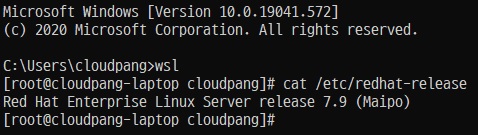
7단계 - 실행 화면
CMD 참에서 wsl 또는 bash 입력하고 엔터하면 Red Hat Enterprise Linux Server로 전환이 됩니다.